Description
Product Description
Focusrite quality ? for your iPad, Mac and PC
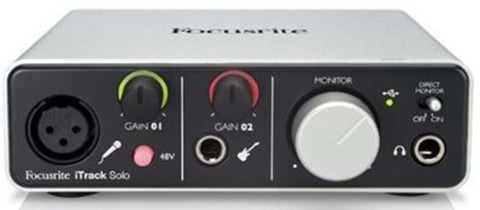
iTrack Solo is the best way to record instruments and vocals on your iPad. Featuring a legendary Focusrite mic preamp and a dedicated input for electric and bass guitars, it’s the easiest way to record great quality music using Garageband or any of your favourite apps.
A certified “Made for iPad” device, we have one version of iTrack Solo for Lightning compatible iPads and another for earlier generation devices. Both are fully compatible with your PC or Mac as well, and come with all the software you need to get started, including Ableton Live Lite and the Focusrite Scarlett Plug-in Suite.
Get started
Just connect your iTrack Solo to a power supply and an iPad and you?re ready to go! With the very best in digital audio technology encased by a rugged aluminium unibody chassis, iTrack Solo will capture and playback your sound with pristine quality.
Plug straight in
The front panel has an input for a microphone and an input for an instrument (such as an electric guitar, bass guitar or the output of an electro-acoustic guitar). This makes the iTrack Solo perfect for capturing the output of a microphone, or using an electric guitar with one of the many guitar amp applications on iPad.
Keep an eye on your audio
Unique signal halos let you know that you?ve got a good audio level for recording. Green is good and red means that your audio is too loud, and that you should turn down the level control.
Features:
High Quality Mic Preamp – The preamp design on the iTrack Solo is the same design as used in the Scarlett and Saffire audio interface ranges, used and trusted by top musicians and artists around the world.
High Quality Outputs – With a dynamic range of over 105dB, your music will sound amazing going out of the iTrack Solo?s professional digital to analogue conversion.
Rugged Metal Unibody Case – The tough aluminium unibody chassis ensures that your iTrack Solo can withstand life on the road, and looks great next to your iPad.
Unique Signal Halos – The gain halos which surround the gain knob for each input provides an easy way to know that the signal you?re recording is the right level. It will show green when the signal is at a good level (above -24dBFS). If it turns to red, you know that the signal is too loud and is therefore clipping ? if this happens, simply reduce the gain until the halo returns to green.
Direct Monitor Function – Flick the direct monitor switch on the front panel of your iTrack Solo and you will hear what you are recording through your speakers or headphones, without the signal having to go through your iPad or Mac / PC. This avoids the possibility of “latency” (a slight time delay) being introduced by your music app, which can be distracting while recording.
Technical Details:
Microphone input
USB 2.0 Connectivity
Frequency – 20Hz – 20kHz +/- 0.2dB
22.9 x 10.2 x 17.8 cm
771 g

Reviews
There are no reviews yet.